
Best way to connect wallet
Today I will present the best option in order to handle wallet connection into your web3 site.
I used different libraries like web3-modal, wagmi only, manual connect button like if(window.ethereum) in the past to reach the same behavior but this was really simple and easy to configure, supporting different wallets, chains and highly customizable.
The magic library is Rainbow Kit that uses wagmi and ethers js dependencies.
Wallet management Out-of-the-box wallet management for your dapp. Aside from handling the connection and disconnection of wallets, RainbowKit supports numerous wallets, swaps connection chains, resolves address to ENS, displays balance and much more!
We will review the manual installation setup for a new or existing react/next project:
npm install @rainbow-me/rainbowkit wagmi ethersImport
Import RainbowKit, wagmi, and ethers.
import '@rainbow-me/rainbowkit/styles.css';

import {
  getDefaultWallets,
  RainbowKitProvider,
} from '@rainbow-me/rainbowkit';
import {
  chain,
  configureChains,
  createClient,
  WagmiConfig,
} from 'wagmi';
import { alchemyProvider } from 'wagmi/providers/alchemy';
import { publicProvider } from 'wagmi/providers/public';
Configuration
const { chains, provider } = configureChains(
  [chain.mainnet, chain.polygon, chain.optimism, chain.arbitrum],
  [
    alchemyProvider({ apiKey: process.env.ALCHEMY_ID }),
    publicProvider()
  ]
);

const { connectors } = getDefaultWallets({
  appName: 'My RainbowKit App',
  chains
});

const wagmiClient = createClient({
  autoConnect: true,
  connectors,
  provider
})
Wrap providers Wrap your application with RainbowKitProvider and WagmiConfig.
const App = () => {
  return (
    <WagmiConfig client={wagmiClient}>
      <RainbowKitProvider chains={chains}>
        <YourApp />
      </RainbowKitProvider>
    </WagmiConfig>
  );
};
Add the connect button Then, in your app, import and render the ConnectButton component.
import { ConnectButton } from '@rainbow-me/rainbowkit';

export const YourApp = () => {
  return <ConnectButton />;
};
Customize
Add dark mode
import { RainbowKitProvider, darkTheme } from '@rainbow-me/rainbowkit';

export const App = () => (
  <RainbowKitProvider theme={darkTheme()}>
    {/* Your App */}
  </RainbowKitProvider>
);
Label Use the label prop to set a custom ConnectButton text.
<ConnectButton label="Sign in" />Account status Here are a few different ways you can use the accountStatus prop.
Only show the account's avatar.
<ConnectButton accountStatus="avatar" />Only show the account's address.
<ConnectButton accountStatus="address" />Show balance
Use the showBalance prop to hide/show the balance.
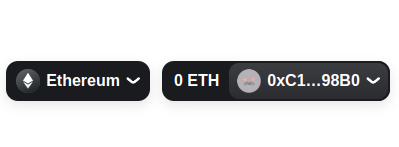
<ConnectButton showBalance={false} />